In his new column, “The 80/20 Principle,” Ernie Svenson demystifies technology and introduces tools that improve your workday. Here’s his take on why more lawyers should be using Loom to record and share videos that save them time (and why most aren’t).

Key Takeaways: Why Loom Is a Game-Changer
- Kill the “Quick Call.” Replace disruptive, synchronous meetings with shareable videos that recipients watch on their own schedule.
- Effortless Delegation. Show, don’t just tell. Walking a staff member through a document on screen is 10 times faster than typing an email.
- Instant SOPs. Use a simple screen recording to instantly capture standard operating procedures.
- Follow-through. Get notified the second a client, colleague or delegatee watches your video, so you know when to follow up.
Most lawyers rely far too heavily on synchronous communication. Zoom calls. Screen shares. Meetings that require everyone to be available at the same time — even when the issue could have been handled in minutes without scheduling friction. That’s where Loom comes in.
What Is Loom? Video Messaging for Attorneys
Loom is not a “video tool” in the traditional sense. It is an asynchronous communication and collaboration tool that records and creates shareable videos. You record your screen while you talk (and have your face appear on screen in a small window, if you want). Then you get a link you can share instantly, and the recipient watches it when it suits them.
For lawyers — especially those working with staff, contractors, co-counsel or clients — this changes how work gets done.
Asynchronous Communications Beats Synchronous
Zoom is synchronous. Everyone has to stop what they’re doing at the same time.
Loom is asynchronous. You explain something once. Others watch it when convenient.
That difference matters.
With Loom, you can:
- Walk someone through a document while showing it on screen.
- Give clear instructions without writing long emails.
- Explain context that would take paragraphs to type.
- Avoid “Can you jump on a quick call?” interruptions.
You speak and show. That’s it.
Loom Is Perfect for Law Firm Delegation and Direction
Loom shines when you are giving instructions. Instead of typing a long explanation or scheduling a meeting, you record a short Loom:
- “Here’s what I want changed in this document.”
- “Here’s how I want this intake handled.”
- “Here’s what to do next time this happens.”
Recipients can:
- Watch at their own pace.
- Pause or rewind.
- Leave time-stamped comments exactly where the question arises.
- React with quick acknowledgments.
You also get notified when they watch it. No guessing whether your message was seen.
No Camera Required
Many lawyers hesitate to use Loom because they think they must appear on camera. You don’t.
Loom works perfectly for recording your screen and voice. No face, no lighting, no performance required.
In fact, most Looms are screen-only. If you want to appear on screen, you can. If not, don’t.
Using AI and Screen Recordings Saves Time
Loom is not just a convenient recording tool. It also uses AI in ways that are truly powerful.
It can:
- Automatically generate transcripts.
- Create titles and descriptions.
- Remove long silences and filler words with one click.
- Let you edit the video by editing the transcript.
- Generate SOPs from your recordings, complete with screenshots.
That last feature is particularly powerful. You record once, click “Create SOP,” and Loom produces a document you can reuse, refine and share.
Related Reading: “Create SOPS for Your Law Firm in 5 Easy Steps.”
Loom Metrics: Feedback You Can Actually Use
When you send a Loom, you can see:
- Who watched.
- How much they watched.
- Where people stopped paying attention.
This is invaluable when explaining processes or training staff. You can quickly see whether something is unclear without asking.
Comments and reactions are time-stamped directly to the video, which eliminates back-and-forth confusion.
How Much Does Loom Cost?
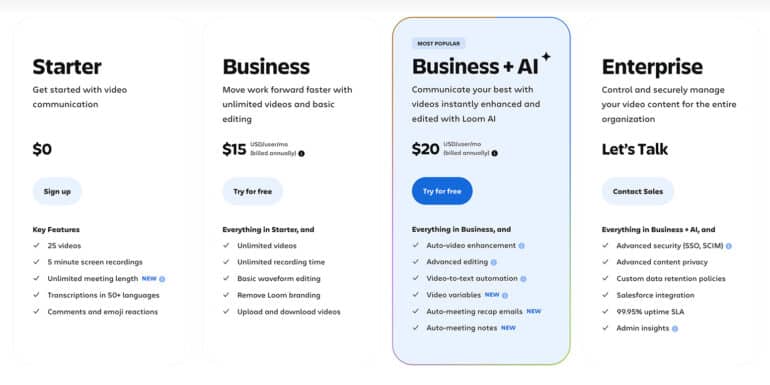
Loom’s Business plan costs about $150-$180 per year, depending on the plan and discounts. Adding the AI features will cost a little more ($20 per user). There’s also a free tier that includes:
- Up to 25 videos.
- Each up to five minutes long.
That’s enough to experience the value. Most Loom videos should be under five minutes anyway.
The Real Barrier: Habit, Not Difficulty
Loom is easy to use. The real challenge is remembering to use it.
At first, it may feel slightly awkward to talk instead of type. That passes quickly.
Then comes the second hurdle: resisting the thought, “This will only take 30 seconds to explain.”
That’s exactly when Loom is ideal.
Thirty seconds. Two minutes. Five minutes. It doesn’t matter. If your message involves explanation, context or showing something on screen, Loom is almost always better than an email — and often better than a meeting.
The Bottom Line on Loom for Lawyers
Loom is one of the most effective tools available for remote work, delegation and collaboration. Lawyers who use it consistently communicate more clearly, reduce meetings and create reusable knowledge without extra effort.
Most lawyers are not using it — not because it’s complicated, but because they haven’t tried it long enough to see the payoff.
So here’s my final advice: Record 25 Looms. Share them. Watch what happens.
More From Ernie Svenson and the 80/20 Principle
Top 8 Tech Tools for Solo and Small Firm Lawyers to End the Chaos
AI Tools for Lawyers: Why You Shouldn’t Stick to Just One
Our Fingers Can’t Keep Up With AI
Image © iStockPhoto.com.

Sign up for Attorney at Work’s daily practice tips newsletter here and subscribe to our podcast, Attorney at Work Today.